Find out which keyboard / input language the user is typing with, get notified when they
switch, and make any TextField flip to right-to-left automatically, with a correct Unicode
first-strong-character fallback for when the OS can't tell you.
Solves flutter/flutter#25841 ("detect the keyboard language"). Also answers flutter/flutter#99606 ("change the keyboard language from code"): it works on macOS and Windows, and on the other platforms the OS doesn't allow it (see below).
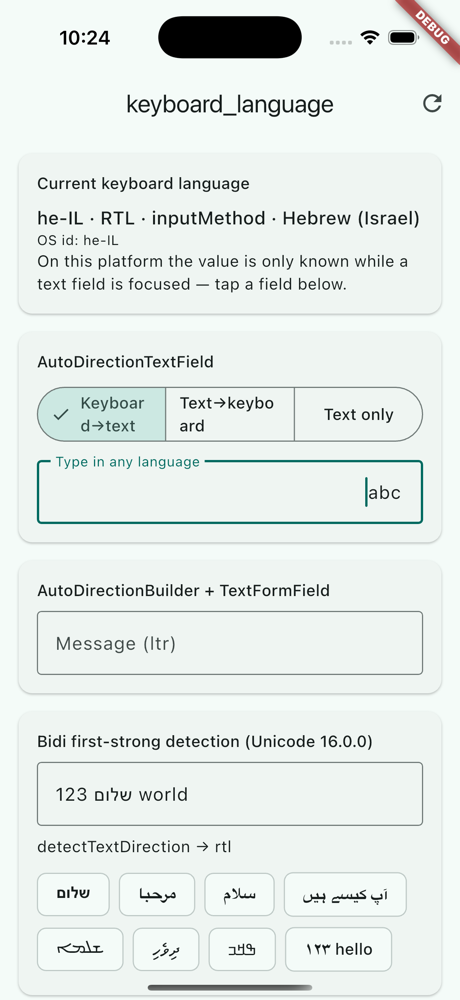
Example app on the iOS 18.6 simulator: the Hebrew keyboard is detected (he-IL · RTL) and the
auto-direction field has switched to right-to-left.
Flutter has no API for the active input language. An app therefore can't set textDirection to
RTL when the user picks an Arabic or Hebrew keyboard, and can't show a language badge or adapt the
UI. This package reads the language from each OS's native API and resolves a TextDirection from
it.
dependencies:
input_language: ^0.1.1import 'package:input_language/input_language.dart';
final InputLanguage? language = await KeyboardLanguage.current;
print(language?.languageTag); // "ar", "he-IL", "en-US", "zh-Hans" …
print(language?.isRtl); // true for Arabic, Hebrew, Persian, Urdu, …
print(language?.locale); // Locale('he', 'IL')
print(language?.displayName); // "Hebrew – QWERTY" (OS-provided, localised)
print(language?.source); // inputMethod | keyboardLayout | browserLocale
final sub = KeyboardLanguage.onChanged.listen((InputLanguage? l) {
// Fires when the user switches keyboards. null = no language-bearing keyboard is known.
});
final enabled = await KeyboardLanguage.available(); // the user's enabled keyboards
final caps = await KeyboardLanguage.capabilities(); // what this platform can doAutoDirectionTextField(
decoration: const InputDecoration(labelText: 'Message'),
policy: AutoDirectionPolicy.keyboardThenText, // default
)Or wrap any field (TextFormField, CupertinoTextField, …):
AutoDirectionBuilder(
  controller: controller,
  builder: (context, direction, focusNode) => TextFormField(
    controller: controller,
    focusNode: focusNode,
    textDirection: direction,
  ),
)
For full control, use KeyboardDirectionController (a ValueListenable<TextDirection>) or the
pure function resolveTextDirection(text:, keyboard:, policy:, fallback:).
| Policy | Behaviour |
|---|---|
keyboardThenText (default) |
Keyboard language when known, else the first strong character of the text, else the fallback. |
textThenKeyboard |
Text first. Good for message bodies: an Arabic paragraph stays RTL even if the user switches to an English keyboard to type one word. |
keyboardOnly / textOnly
|
Only the keyboard / only the text. textOnly needs no platform support. |
The keyboard is only consulted while the field is focused (keyboardOnlyWhileFocused: true). The
web's weak browser-locale hint never overrides typed text.
Bidi is short for bidirectional text: text that mixes scripts written right-to-left
(Hebrew, Arabic, Persian, Urdu and others) with scripts written left-to-right (English and most
other languages) and with digits. A text field can only lay out its content in one base
direction, so it has to choose: should שלום world start from the right edge or the left?
Get it wrong and the cursor jumps to the wrong side, punctuation lands at the wrong end of the line, and right-to-left users see their sentence scrambled. The OS keyboard language (above) tells you what the user intends to type; Bidi detection tells you what the text actually contains, which matters for text that was pasted, loaded from a server, or typed before the keyboard was switched.
detectTextDirection('123 - שלום');          // TextDirection.rtl
detectTextDirection('Flutter و دارت');      // TextDirection.ltr
detectTextDirection('٣٤٥ 😀');              // null (no strong character)
isRtlLanguageTag('ur-PK');                  // true
isRtlLanguageTag('pa-Arab'); // true, 'pa' alone → falseUnicode defines how bidirectional text works in the Unicode Bidirectional Algorithm (UAX #9). Its rule for choosing a paragraph's direction is simple: skip everything that has no direction of its own, and use the direction of the first strong character. Every character falls into one of three groups:
| Group | What it means | Examples |
|---|---|---|
Strong left-to-right (L) |
Letters of left-to-right scripts |
A, ж, क, 中
|
Strong right-to-left (R, AL) |
Letters of right-to-left scripts (AL is the Arabic-letter class) |
ש, ب, پ, ܐ
|
| Weak or neutral | Characters that take their direction from the text around them | digits 1 ٣, spaces, - . ?, emoji, vowel and accent marks |
detectTextDirection returns the direction of the first strong character it finds, or null
when the text has none. Use null to keep whatever direction you had before, for example the
app's locale or the keyboard's language.
| Text | Result | Why |
|---|---|---|
123 - שלום |
rtl |
123, the spaces and - are not strong; the first strong character is Hebrew ש. |
Flutter و دارت |
ltr |
F is the first strong character, even though the text also contains Arabic. |
٣٤٥ 😀 |
null |
Arabic-Indic digits and an emoji are not strong, so the text has no direction yet. |
سلام! |
rtl |
The first strong character is Arabic س; the ! does not count. |
(Hello) |
ltr |
The parenthesis is neutral; H decides. |
Two details that trip up simpler implementations:
-
Vowel and accent marks are not strong. Arabic harakat, Hebrew niqqud, and Syriac and Thaana
vowels sit on top of letters but have no direction of their own (
NSM). Text that starts with such a mark is still decided by the letter that follows. -
Isolated text is skipped. Text wrapped in the Unicode isolate controls (
LRI,RLIorFSIup to the matchingPDI) is meant to be laid out on its own, so its letters never decide the direction of the surrounding paragraph. A quoted English name inside a Hebrew sentence, wrapped in an isolate, does not flip the sentence to left-to-right.
-
detectTextDirection(text): you have the text. Use it for pasted or server-loaded text, chat messages, search results, or as the fallback when the platform can't report the keyboard. -
isRtlLanguageTag(tag): you only have a language tag such asar-EG,he,fa-IRorur-PK, for example from the keyboard or the device locale. The script part of the tag wins when present:pa-Arab(Punjabi in Arabic script) is right-to-left, while plainpa(written in Gurmukhi) is left-to-right. -
AutoDirectionTextField(above) combines both: it follows the keyboard while the field is empty and the typed text once there is some, according to the policy you choose.
detectTextDirection implements UAX #9 rules P2/P3: it returns the direction of the first strong
character (L, or R/AL) and skips text inside isolates (LRI/RLI/FSI…PDI). It uses a table generated
from the Unicode 16.0 character database (tool/generate_bidi_table.py), so combining marks
(harakat, niqqud, Syriac and Thaana vowels, N'Ko tones), Arabic-Indic digits and punctuation are
correctly not strong. It covers Hebrew, Arabic (Persian and Urdu letters, Supplement,
Extended-A/B/C, Presentation Forms), Syriac, Thaana, N'Ko, Samaritan, Mandaic, Adlam and Hanifi
Rohingya, and the RTL defaults for unassigned code points in those blocks. It looks at the first
paragraph only, the same way a text field applies one direction to all of its content.
try {
  final ok = await KeyboardLanguage.setLanguage('ar'); // false if no Arabic keyboard is installed
} on UnsupportedError {
  // iOS, Android, Linux, web
}| iOS | Android | macOS | Windows | Linux | Web | |
|---|---|---|---|---|---|---|
current |
✅ while a field is focused | ✅ | ✅ | ✅ | ||
onChanged |
✅ notification | ✅ poll + IME broadcast | ✅ distributed notification | ✅ WM_INPUTLANGCHANGE
|
gsettings monitor / poll |
languagechange
|
available() |
✅ activeInputModes
|
✅ enabled subtypes | ✅ | ✅ | navigator.languages
|
|
setLanguage |
❌ | ❌ | ✅ TISSelectInputSource
|
✅ ActivateKeyboardLayout
|
❌ | ❌ |
| Typed-text fallback | ✅ | ✅ | ✅ | ✅ | ✅ | ✅ |
-
iOS: reads
textInputMode.primaryLanguageof the first responder and observesUITextInputMode.currentInputModeDidChangeNotificationand keyboard show/hide. While a Flutter text field is being edited, the first responder is the engine's hidden text input view. So the value is only reliable while a text field is focused; otherwisecurrentisnull. The emoji keyboard and dictation reportnull. Apps can't change the keyboard (no public API). -
Android: reads
InputMethodManager.getCurrentInputMethodSubtype()(languageTag, falling back to the legacylocale). Android has no broadcast for subtype changes, so whileonChangedhas listeners the plugin polls the subtype (a cheap call, everyKeyboardLanguage.pollInterval, default 500 ms) and also listens forACTION_INPUT_METHOD_CHANGED(IME switches). Gboard publishes one subtype per enabled language and normally updates the current subtype when the user switches language with the globe key or a space-bar swipe. With Gboard's multilingual typing (two languages on one layout), or IMEs such as SwiftKey that type several languages at once, only the primary subtype is reported. Some IMEs publish no subtypes at all (null). Test on the IMEs your users actually have. Apps can't switch the IME or its subtype. -
macOS: Text Input Sources:
TISCopyCurrentKeyboardInputSource(layouts and IME input modes), thekTISNotifySelectedKeyboardInputSourceChangeddistributed notification, andTISSelectInputSourceforsetLanguage. It can only select sources the user has enabled. -
Windows:
GetKeyboardLayout→ LANGID →LCIDToLocaleName,WM_INPUTLANGCHANGE(andWM_ACTIVATE) on the top-level window,GetKeyboardLayoutList, andActivateKeyboardLayoutforsetLanguage. It reports the language, not the IME's conversion mode. It can only activate installed layouts. -
Linux (best effort): GNOME
org.gnome.desktop.input-sources(mru-sources, withgsettings monitorfor changes), otherwise the IBusibus enginecommand (polled). XKB layouts and IBus engine names are mapped to languages. Fcitx, KDE without IBus and other setups returnnull. Setting the language isn't supported. -
Web: browsers don't expose the keyboard or IME language.
currentreturnsnavigator.languagemarkedsource: browserLocale(capabilities().isWeakHint == true), andAutoDirectionTextFieldlets typed text override it.
- iOS needs a focused text field; Linux coverage depends on the desktop; the web only gives a hint.
- Android multilingual IMEs report a single (primary) language.
-
detectTextDirectionlooks at the first paragraph only, the same way a text field applies one direction to its content. - Unassigned code points outside the right-to-left default blocks are treated as L, as
DerivedBidiClass.txtspecifies. Noncharacters and default-ignorables are neutral.
On the iOS 18.6 simulator, example/integration_test/keyboard_runtime_test.dart passed with the
Hebrew keyboard and with the Arabic keyboard: after a field was focused, current returned
he-IL / ar (RTL), onChanged emitted null and then the language as the keyboard appeared,
and AutoDirectionTextField switched to right-to-left. Blurring and refocusing emitted null
and then the language again. The test can't switch the simulator keyboard while an app is running
(there's no API for that, and changed preferences only apply on the next launch), so a live switch
while the field has focus still has to be checked by hand.
example/ shows every feature: current language, change log, enabled keyboards with tap-to-switch,
capabilities, the auto-direction field with each policy, the builder, and the bidi playground.
flutter test integration_test -d macos exercises the real native code.
MIT © 2026 Manish Kumar Panday